Effective Aug. 25, 2022, a new Smart Edit will be available for commercial plans to help with coordination of benefits when you submit a claim.
How the new Smart Edit works When you submit a claim for a member who has a commercial plan and primary health insurance with another carrier, you’ll receive 1 of the following 3 messages on your 277 Claims Acknowledgement report within 24 hours of submission:
REJECT – This patient has primary insurance coverage with <other insurance name>, <effective Date>. Please resubmit as electronic secondary once adjudicated by the primary payor. a. You’ll receive this message if we have the primary health insurer’s name and effective date, but don’t have the other carrier’s EOB.
REJECT – This patient has primary insurance coverage with another carrier with <effective date>. Please resubmit as electronic secondary once adjudicated by the primary payor. a. You’ll receive this message if we have the effective date, but don’t have the other carrier’s name or EOB.
REJECT – This patient has primary insurance coverage with another carrier. Please resubmit as electronic secondary once adjudicated by the primary payor. a. You’ll receive this message if we’re missing the carrier’s name, effective date and EOB.
What is the Smart Edits tool? We developed the Smart Edits tool to identify billing errors within a claim so you can quickly review and repair problematic claims. We send these messages within 24 hours of a claim submission so you can review identified claims in a matter of hours instead of potential claims denials days later.
Claims that are accurately submitted and in compliance with the latest policies and regulations result in less rework, quicker approvals and faster payments.
Learn more
For information on how to submit the primary payer EOB online, visit UHCprovider.com/ediclaimtips > Secondary/COB or Tertiary Claims and Medicare Crossover > COB Electronic Claim Requirements – Commercial
Computer-assisted surgical and musculoskeletal navigation coding update. Aetna® will no longer consider the following codes for separate reimbursement: • 20985 (Computer-assisted surgical navigational procedure for musculoskeletal procedures, image-less (List separately in addition to code for primary procedure)) • 0054T (Computer-assisted musculoskeletal surgical navigational orthopedic procedure, with image-guidance based on fluoroscopic images (List separately in addition to code for primary procedure)). The use of computer-assisted surgical navigation is considered integral to the performance of the procedure.
New federal guidance clarifies that relaxed HIPAA enforcement will end at the conclusion of the COVID-19 public health emergency (PHE), while offering instruction on how physicians and others covered by HIPAA can continue to use remote communication technologies to provide audio-only telehealth services.
Back at the start of the pandemic, the U.S. Department of Health and Human Services (HHS) Office for Civil Rights (OCR) said it would not “impose penalties for noncompliance with the regulatory requirements under the HIPAA Rules against covered health care providers in connection with the good faith provision of telehealth during the COVID-19 nationwide public health emergency.”
In the new guidance, OCR reiterated that this discretion remains in effect only until the HHS secretary determines the PHE no longer exists or when it expires, whichever occurs first. Congress previously granted a five-month extension for other COVID-related waivers following the conclusion of the PHE..
OCR issued the guidance in direct response to a December 2021 presidential executive order intended to help ensure patients can continue to benefit from audio-only telemedicine and telehealth services with protection of their personal health information.
The new guidance elaborates on types of technologies, business associate agreements with vendors, and ensuring HIPAA compliance when using audio-only technologies.
The Texas Medical Association has numerous resources designed to help physicians adopt and effectively use telemedicine. Visit TMA’s telemedicine page for more information.
Click on the blue highlighted text within the article for more information.
OR
Head to the Business End File and view articles on Telemedicine, and Telemedicine Policy, Procedure, and Form Templates
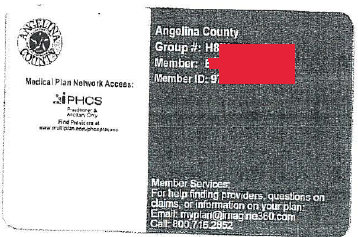
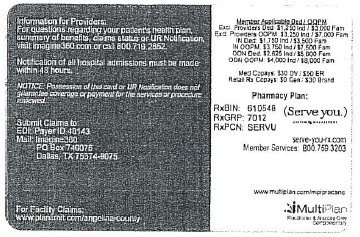
We apologize these are not the best pictures, but we wanted to get this out to you, asap.
Some of you have already seen this new card from Angelina County. POET’s contract is with Angelina County not GPA or Imagine 360. POET has reached out to both Angelina County and Imagine 360. Imagine 360 told POET the benefits have not changed. We have asked if your representative will remain the same and are waiting for that response. As information comes in, we will keep you informed. Please let POET know if you are not paid according to contract
Scammers can now use technology to make your office caller ID show when they make a phone call. This is called “Caller ID Spoofing”. They can also “clone” your phone number to steal your information.
One local physician’s office reports it is happening to their patients.
The caller is asking patients to verify their date of birth, Social Security and Medicare number along with other information.
Protect your patients! Let them know to be on alert. Remember Social Security numbers are no longer part of claim information.
If you have this information in your patient’s file you should redact it for your protection.
Remind your patients that you would not call them for this information, and they should never give their social security information out over the phone.
Medicare nor the Social Security Department call for information.
Tell your patients to hang up as soon as possible, call you and report the call to the Federal Trade Commission.
Report telephone scams online to the Federal Trade Commission. You can also call 1-877-382-4357 (TTY: 1-866-653-4261). The FTC is the primary government agency that collects scam complaints. Report all robocalls and unwanted telemarketing calls to the Do Not Call Registry.
Do you have Cigna MA Patients, that need relief from this Summer Heat?
Cigna MA is offering it’s customers transportation to “Cooling Centers” or other public locations that provide Air Conditioning (i.e. Library or Senior Center)
It’s basic, but the employees seem to really like it.
1. Use the + to add a tab for each employee. 2. Rename each tab to your employee’s names. 3. Copy and paste the content from the ‘Employee A’ tab to the rest of your employee tabs. 4. Update the DATA INPUT tab with the amount your clinic pays for each employee on a monthly bases (this info will pull into the employee’s individual tabs). 5. In each employee tab, input the amount you pay monthly for Life Insurance (if you provide that benefit) in column B. 6. In each employee tab, modify as needed, the number of days you give for PTO, Holiday & the Retirement % (you’ll need to update both the description and also the formulas in column C). 7. Add or remove benefits as it applies to your clinic and employee.
I hope you find this to be helpful! Connie McVein, Chief Executive Officer Oregon Neurology, Springfield OR







Recent Comments