Change in prior authorization administration for DME services, effective March 1, 2026
Effective March 1, 2026, HealthSpring will manage prior authorizations for durable medical equipment services, as well as orthotic and prosthetic codes. Lorem ipsum dolor sit amet, consectetur adipiscing elit. Ut elit tellus, luctus nec ullamcorper mattis, pulvinar dapibus leo.
EviCore healthcare will continue to manage prior authorizations for DME services through Feb. 28, 2026.
What this means to your patients through Feb. 28, 2026
· Submit prior authorization requests with dates of service before March 1, 2026, to EviCore as usual.
· Continue to refer to EviCore for the most updated prior authorization code lists.
· There are no changes to the claims submission or appeals processes.
Key changes effective March 1, 2026
· DME providers will submit prior authorization requests directly to HealthSpring.
· Submit prior authorization requests to HealthSpring for dates of services beginning March 1, 2026. Request prior authorization through Availity Essentials™, our provider portal.
· A list of procedural codes requiring prior authorization is available on the clinical review page of our provider website, HealthSpring.com/Providers.
· Any authorization issued prior to March 1 will remain valid for those dates and services. That means, any authorizations approved by EviCore before March 1 will remain effective with HealthSpring. You do not need to submit a new prior authorization request.
How to request prior authorization
Request prior authorization through our provider portal, Availity Essentials. This portal is the preferred and fastest method. Refer to Availity for instructions on setting up an account and navigating the portal. If you prefer, you can also call 1-800-914-8252 or fax 1-877-451-5541.
Novitas has made learning more convenient by offering helpful tutorials on YouTube. These short videos provide quick guidance on common Medicare topics, making it easier to find answers without having to attend a full webinar.
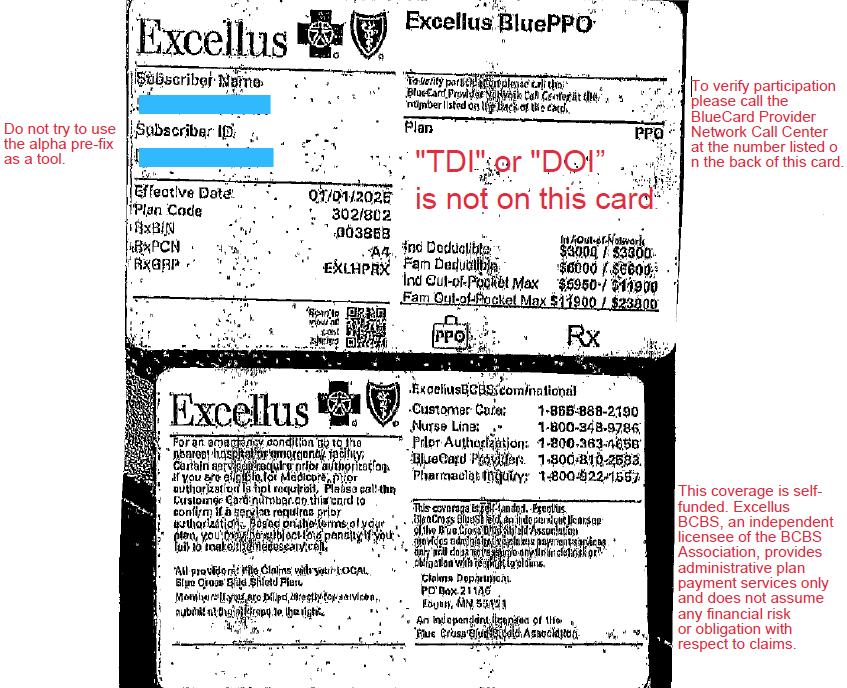
Some one gives you this card and wants to make an appointment.
They seem to want an answer right now.
You know your physician takes Blue Choice, but have never seen this card before. How would you know?
Look at the front of the card. Blue Cross is written all over it. BCBS must be the insurer? STOP!
Do you see any insurance regulation language? Is “TDI” or “DOI” on this card?
NO. This is your 1st clue. The employer may be the insurer.
Scan the front of the card intently. Are there any other clues. Look for what you know, not what you don’t know.
If not flip it over. What do you see? READ ALL THE TINY WRITING.
On this card: phone numbers, addresses, where to file, prior auth info. But what else?
“This coverage is self-funded Excellus BlueCross BlueShield, and independent licensee of the BlueCross BlueShield Association provides administrative claims payment services only and does not assume any financial risk or obligation with respect to claims.”
What does that mean:
The employer is the insurer (self-funded plan)
Excellus BCBS is acting as a Third-Party Administrator (TPA)
Is this a Lease Network?
Very likely — yes.
On the front of the card it says:
“To verify participation, please call the BlueCard Provider Network.”
That suggests:
The plan is using the BlueCard network
Excellus is providing network access + claims processing. The employer is leasing the BCBS network
That’s what we commonly call a lease network arrangement.
But — this is important — don’t assume, Verify
Why you may still get a “Yes” when you call
When you call provider services:
The rep may simply see “In Network”
They may not understand lease networks
They may not understand the difference between:
Payor
TPA
Repricer
Network administrator
So we need to ask better questions.
Instead of just asking “Is Dr. Smith in network?”
Tell the representative you would like to check network participation.
Ask:
Is this plan self-funded? (if it is self-funded it is not a lease network)
Is Excellus the payor, or the administrator?
Is this a leased network?
Who bears the financial risk?
Is Excellus repricing the claims?
What network applies to this patient?
And always get:
✔ Representative name ✔ Date/time ✔ Call reference number
If the claim denies, that reference number becomes your leverage.
Why this matters
In lease network plans:
The employer controls the benefits.
The employer may carve out services.
The employer may override network rules.
The plan can be patient-specific.
Basically they can make up their own rules.
In practical terms — They have more flexibility than a fully insured DOI-regulated plan.

Recent Comments