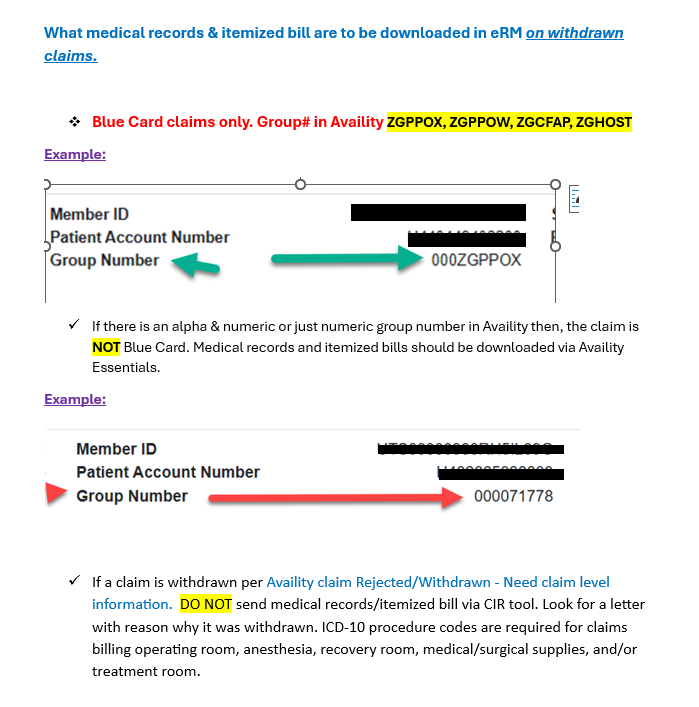
“The Claim Inquiry Resolution (CIR) tool within the Electronic Refund Management (eRM) portal accessed via Availity® Essentials only accepts inquiry submissions related to High-Dollar, Pre-Pay Review requests for most Host (BlueCard® out-of-area) claims (Medical Records and/or Itemized Bills). The other inquiry options that were available via CIR have transitioned to the Availity Claim Status Tool’s Dispute Claim or Message This Payer features.” Per BCBS Provider Education.
As a reminder, claims submitted with invalid or unclean data will result in denial or rejection of an entire claim. Superior has provided a list of important claim submission tips and common billing errors to help ensure your claims are processed quickly and efficiently.
Check the TrackIt Action Required bar regularly to see the status of claims, reconsideration requests and more
To take action on a specific claim in the portal, go to Claims & Payments and search for a claim. Once you’ve searched for a claim and selected Act on a Claim, a list of actions will appear (e.g., View Claim Reconsideration, File Appeal/Dispute). Based upon the current status of the claim or previously taken actions, the buttons will either be blue or grayed out. If grayed out, that specific action is unavailable.
Please note: Available actions may vary based on the member’s plan type, provider’s participation status and regulations
If a claim(s) from your claim search results shows an “Acknowledgement” status, it hasn’t been processed. You’ll be unable to submit requests related to this claim.
Reminder: Appeal response letters are no longer mailed, but you can view and print them through the portal using Document Library
There are many reasons to love TrackIt. But this time of year, its ability to save you time ranks pretty high. Need to add information to a claim or check a prior authorization status? Skip the phone or waiting for the mail. You can find all that and more in TrackIt. The tool makes it easy to stay on top of your UnitedHealthcare tasks by showing what items need attention, so you can take action in real time — and get back to your holiday to‑do list faster.
POET is working with the TMA regarding UHC OON issues. They have confirmed the following:
If you are billing with a GROUP TIN:
You will not utilize the group NPI# in box 33a – if you do, it will process OON. Only the individual physician’s NPI# should be listed here since your physicians has an individual contract with UHC, not a group contract.
For those claims processing OON, if timely filing limits have not passed you should file corrected claims with the individual NPI in box 33a.
When verifying whether a physician is in or out of network, you should not provide the group NPI#.
This only reflects physicians who are in the POET All Products contract. If you have a direct, POET is unable to direct you in this matter.
Aetna is going paperless. Here is how to get your electronic EOB Statements and Payments.
Starting in September through 2022, we’re phasing out paper Explanation of Benefits (EOB) statements and checks. Sign up before it’s your turn. If you don’t enroll to receive direct deposit payments, you may receive future payments by virtual credit card. Keep reading to learn more.
Get EOB statements from Availity®
Register for our provider portal on Availity. Get identical copies of your EOB statements from the Availity Remittance Viewer. Then print or save them to your computer. You won’t need to wait for them to arrive in the mail.
Sign up for direct deposit payments Sign up for direct deposit payments using our new portal, Payer Enrollment Services. Just goto Payer Enroll Services. We’ll stop using EnrollHub® effective September 1. Even if you’re already enrolled to receive direct deposit payments (or electronic remittance advice), use the new portal to make changes.
Beginning December 1, 2021, you may see new claim edits. These are part of our Third Party Claim and Code Review Program. These edits support our continuing effort to process claims accurately for our commercial and Medicare members. You can view these edits on our provider portal.
We may request medical records for certain claims, such as high-dollar claims, implant claims and bundled-services claims, to help confirm coding accuracy.
You’ll have access to our prospective claims editing disclosure tool. To find out if our new claim edits will apply to your claim, log in to the Availity provider portal. Once there, go to Aetna’s Payer Space > Applications > Code Edit Lookup Tools. You’ll need to know your Aetna® provider ID number (PIN) to use the tools.
For all coding changes, go to Aetna Payer Space > Resources > Expanded Claim Edits
Novitas Solutions, the Medicare payer for Texas, announced that a system error has caused the improper rejection of Medicare Part B claims submitted on or after July 6. Physicians who received a claim rejection message should not resubmit claims at this time. Novitas says it is researching a claims processing system fix. TMA is monitoring the problem.





 Reload document
  Open in new tab
Recent Comments