Hackers are looking for weaknesses and, when found, they’ll pounce.
If any of the following resemble your practice, you are definitely in trouble.
1. You have higher than average employee turnover.
If you’re losing employees more than the norm than there may be a reason behind this – like lower than average pay, less than fabulous working conditions, etc. When employees leave they sometimes take data with them – usually inadvertently but sometimes on purpose to use with a competitor or other vengeful reasons. Re-address your employee concerns and do your best to limit turnover – you will reduce a chance of a hack that way
2. Your staff is remote and/or mobile.
When employees are moving around they are moving around with your data – it can be easily lost or stolen. If an employee or contractor is remote then they are connecting to your database through online services and these have a chance of being hacked. Work with an IT person to make sure you have strong data management and connection tools in place for these remote people and make sure they’re being monitored
3. You have no IT support.
Speaking of an IT (information technology) person: get one. Even the smallest of companies are exposed to a data hack. Paying someone to evaluate your risks, install software, monitor activity and keep things up to date is a critical and essential business cost – even the work is done monthly (it all depends on your size and activity)
4. You do not buy security software.
Subscribe to one of the great security applications like McAfee, Norton, Malwarebytes or Bitdefender. There are many others. These software applications are inexpensive, run quietly in the background of every device and are checking for malware, viruses, infected websites and other tools of the hacker. Make sure this software is always updated.
5. Your employees do not get trained.
Most security problems, particularly at small companies, are from employee-related errors – clicking on bad websites, opening up infected files, etc. Invest in a day of training a few times a year with a good IT security firm so that your employees are well aware of potential problems and can avoid doing dangerous stuff.
6. You have no procedures for securing data.
If you are handling health, financial or other personal information about your customers, and it gets stolen, you could have a big problem on your hands. Keeping this data in an unprotected place means that hackers are going to find it. If this is you, then you’re going to need procedures and policies around the safeguarding of confidential customer data. And after they’re written training will be required to ensure that your employees are complying.
7. Your computers and operating systems are old.
Thousands of computers around the world are still running older, out of date versions of Microsoft Windows. All hackers need is one vulnerable computer to attack and then can get on a network and wreak havoc. One of the best ways to avoid a hack is to ensure that all of your computers are running the most recent versions of Windows or iOS all the time. If a desktop or other device is too old to handle the new operating systems then buy a new one. The cost will pale in comparison to the cost you’ll incur if you’re hacked
8. You have no BYOD policy.
Are your employees allowed to bring their own devices (a BYOD policy) and use them for work? That’s what most companies do. Unfortunately, this can create security issues if they are not monitored. Many companies use remote management software to install company apps on their employees’ devices for a secure access while other companies issue their own devices to their employees which have been secured. So, what is your Bring Your Own Device policy? Every company must have one and every company must have an IT person monitoring those devices.
9. Password changes are not enforced.
Most people are pretty complacent with passwords – the most common one, if you can believe it, is still “1234.” You must require a more complicated password for your employees to enter your network – a combination of letters, numbers and symbols – and this password should be required to be changed every month or two. That way passwords are more difficult to hack and hackers may move on to another easier target.
From Cigna Healthcare: Their provider EFT enrollment functionality was temporarily unavailable from August 12, 2026, through August 17, 2026, because of a new system implementation
Providers affected by record set-up issues may experience delays in processing their electronic funds transfer (EFT) enrollment or preference updates.
Specifically, these updates may take up to six weeks to process. During this period, providers will continue to receive paper checks until the issue is resolved.
Effective Jan. 1, 2026, the Centers for Medicare & Medicaid Services (CMS) requires prior authorization (PA) decisions within seven calendar days for standard (non-urgent) requests for medical items and services (See CMS Interoperability and Prior Authorization Final Rule – CMS-0057-F).
Below is From Humana
Humana is committed to maintaining the new streamlined time frame for PA decisions in accordance with this rule. To comply, all supporting clinical documentation must be submitted at the time of the PA request. Beginning May 16, 2026, providers submitting outpatient Medicare authorization requests for PA services via the Availity Essentials™ portal will be required to upload supporting clinical documentation. Exceptions may apply.
If you have other questions, please call 800-457-4708 (TTY: 711) Monday-Friday, 7 a.m. – 7 p.m., Eastern time.
CMS now requires impacted payers to send PA decisions to providers within 72 hours for expedited (urgent) requests and seven calendar days for standard (non-urgent) requests.
To streamline the PA process and comply with CMS Interoperability and Prior Authorization Final Rule – CMS-0057-F, supporting clinical documentation must be received with the authorization request. This ensures that Humana has the information necessary to promptly and accurately review requests.
This requirement applies to Medicare outpatient authorization requests for PA services submitted directly through Availity Essentials. It does not apply to home health services, inpatient services or Medicaid membership. This change does not impact submissions outside of Availity Essentials.
Availity Essentials will require clinical records to be attached before submission for outpatient PA services. If records are unavailable, your progress will be saved as a draft in the Authorization/Referral dashboard for up to 90 days. You may resume and submit once documentation is available. Please note, draft entries are not considered submissions; Humana will not receive your request until it is submitted with records attached.
Required information may include, but is not limited to, the items below:
• Patient details: Full name, date of birth and Humana policy ID number
• Referring and servicing provider details: Name, National Provider Identifier (NPI), Tax Identification Number (TIN), specialty and contact information (including fax)
• Diagnosis and procedure codes: Accurate International Classification of Diseases (ICD) diagnosis codes (up to six) and procedure codes (up to 10, as applicable) specific to the request
• Treatment details: Specific service, procedure, item or medication being requested, including planned date of service, service location, inpatient or outpatient status, quantity, medication dosage, frequency and duration
• Clinical rationale: Detailed explanation of medical necessity with supporting evidence from medical records. See Humana.com/CoveragePolicies for more information on clinical guidelines.
• Relevant medical history: Past medical conditions, current medications, allergies and significant laboratory results
• Supporting documentation: Imaging studies, laboratory reports, prior treatments or therapies, progress notes or other relevant clinical data that supports the medical necessity of the request
For additional details, please refer to the CMS Interoperability and Prior Authorization Final Rule – CMS0057-F and Humana coverage policies at Humana.com/CoveragePolicies.
Is it October Already? Isn’t it to early for Horror stories?
I think you will find this one pretty chilling,
none the less.
Centers for Medicare and Medicaid Services (CMS) proposes to slash doctors’ payment when they bill an office/outpatient evalutation and management (E/M) service using modifier 25 on the same day as certain global procedures.
While being touted as a measure to reduce health care costs, Texas Medical Association President Bradford W. Holland, MD, warns the proposed change could create a perverse incentive under which patients who could have been treated in one visit end up having to be treated in two visits, a move he calls “unacceptable for patient care.”
Texas physicians routinely diagnose and treat patients in a single visit to avoid unnecessary care delays, and “if this modifier 25 policy is ultimately adopted, we are deeply concerned about the potential impact on patient access to timely care,” he said.
If you attended the Superior Meet and Greet in June, you may remember the discussion about helping our patients change their Primary Care Provider (PCP).
One of the links below provides a downloadable copy of Superior’s PCP Change Request Form, which was discussed during the meeting. You can use this form in your office whenever a member needs to change their PCP.
To save time, you may even want to pre-complete the top section for each PCP in your practice. Keep copies at the front desk so they are readily available, and simply make additional copies as needed.
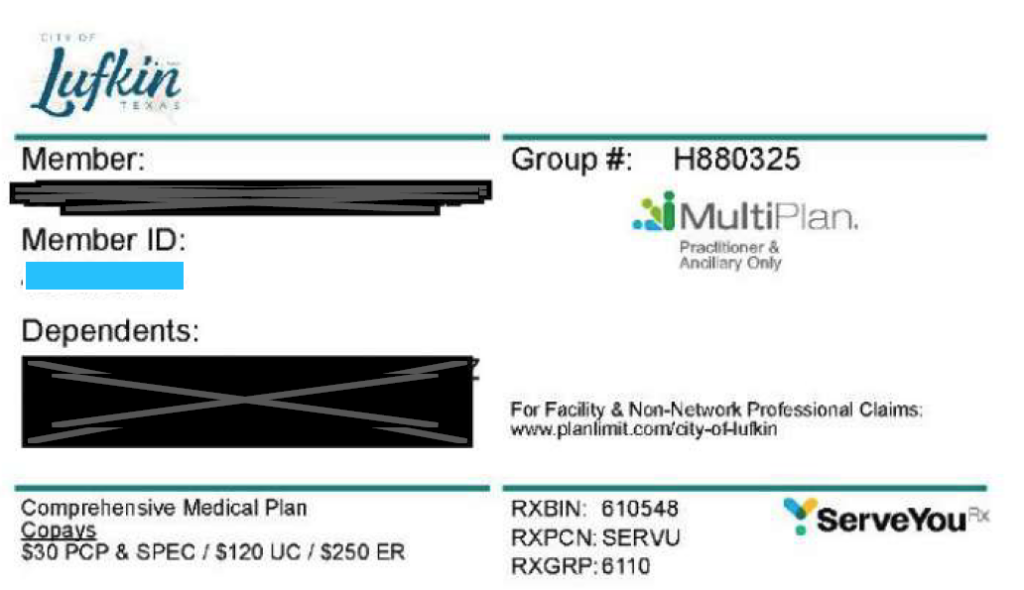
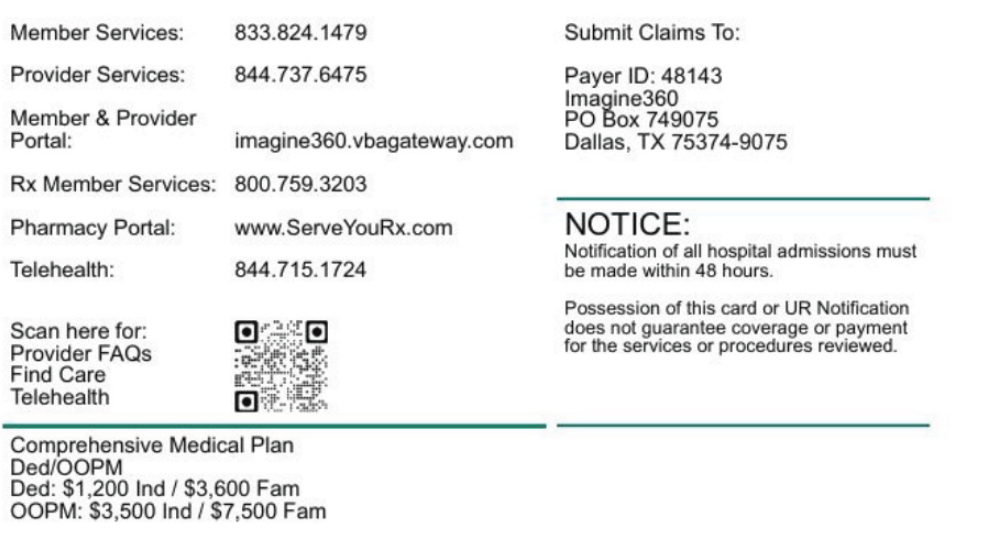
YOU SHOULD ALWAYS CHECK NETWORK PARTICIPATION,
DO NOT SKIP THIS STEP.
Please read this article closely. It could save you time, money, and headaches.
What is an "H" number?
CMS assigns every Medicare Advantage organization a five-character contract number, sometimes called an H-code. That contract number represents the legal agreement between the insurance company and the federal government. A single insurer might hold several contract numbers. Not every contract number starts with “H.” CMS uses different letters for different plan types:
H: Local plans, including most HMOs and local PPOs
R: Regional PPO plans that cover a wider geographic area
S: Stand-alone prescription drug plans (Part D only)
E: Employer-sponsored Medicare Advantage and Part D plans
An "H" number on the card will look like this: H0609-060-000
When comparing Medicare Advantage plan ID cards, it’s important to compare apples to apples.
However, the 5 digit contract number alone is not always enough. For example:
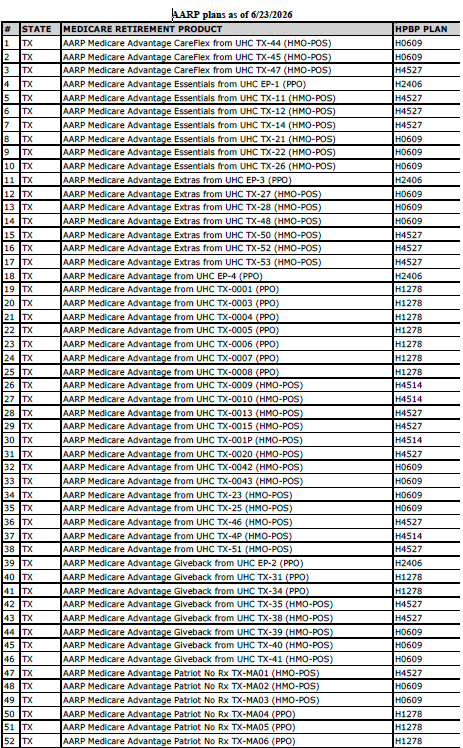
AARP Medicare Advantage CareFlex from UHC-44 (HMO-POS) has contract number H0609.
AARP Medicare Advantage Extras from UHC TX-27 (HMO-POS) also has contract number H0609.
Although these plans share the same contract number, they are different plans.
To accurately identify a member’s plan, compare the entire 11-character Plan ID, not just the H number. Using the full Plan ID helps ensure you are reviewing the correct plan and its associated benefits and network.
Please, Do Not Skip Verification
UHC disclaimer: Oxford Data refresh date: 06/16/2026, all other lines of business: 6/15/2026 To check your participation status with employer-specific plans, please contact your Advocate or Network Account Manager. CONFIDENTIALITY NOTICE: Information accompanying this facsimile is considered to be UnitedHealthcare’s confidential and/or proprietary business information. Consequently, this information may be used only by the person or entity to which it is addressed. Such recipient shall be liable for using and protecting UnitedHealthcare’s information from further disclosure or misuse, consistent with applicable contract and/or law. The information you have received may contain protected health information (PHI) and must be handled according to applicable state and federal laws, including, but not limited to HIPAA. Individuals who misuse such information may be subject to both civil and criminal penalties. If you believe you received this information in error, please contact the sender immediately.
If you would like this list in excel format, please contact POET office.
Remember these are Government Contracts and are subject to change.
And Don't Forget to Ask for Provider Participation


Recent Comments