Some one gives you this card and wants to make an appointment.
They seem to want an answer right now.
You know your physician takes Blue Choice, but have never seen this card before. How would you know?
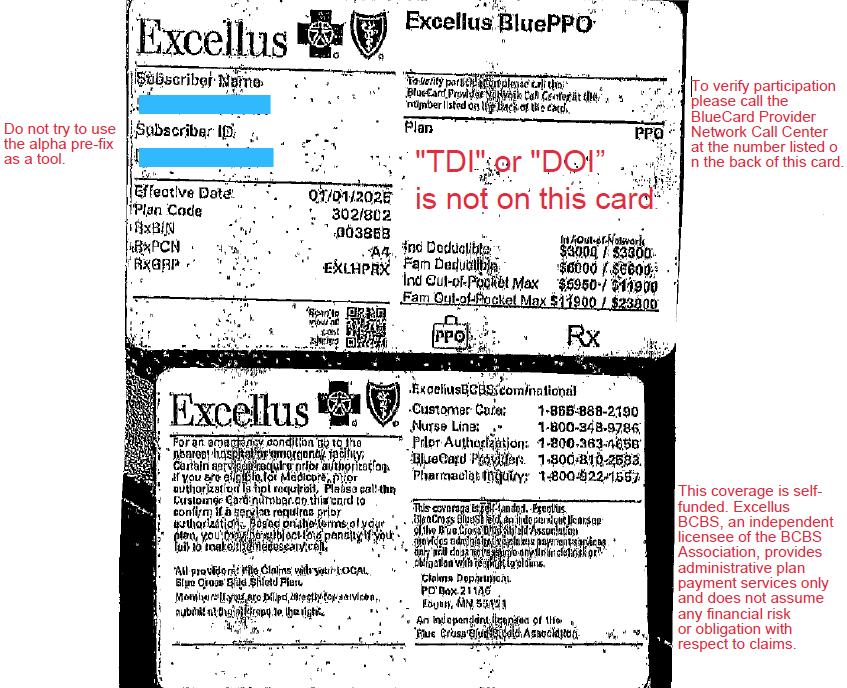
Look at the front of the card. Blue Cross is written all over it. BCBS must be the insurer? STOP!
Do you see any insurance regulation language? Is “TDI” or “DOI” on this card?
NO. This is your 1st clue. The employer may be the insurer.
Scan the front of the card intently. Are there any other clues. Look for what you know, not what you don’t know.
If not flip it over. What do you see? READ ALL THE TINY WRITING.
On this card: phone numbers, addresses, where to file, prior auth info. But what else?
“This coverage is self-funded Excellus BlueCross BlueShield, and independent licensee of the BlueCross BlueShield Association provides administrative claims payment services only and does not assume any financial risk or obligation with respect to claims.”
What does that mean:
The employer is the insurer (self-funded plan)
Excellus BCBS is acting as a Third-Party Administrator (TPA)
Is this a Lease Network?
Very likely — yes.
On the front of the card it says:
“To verify participation, please call the BlueCard Provider Network.”
That suggests:
The plan is using the BlueCard network
Excellus is providing network access + claims processing. The employer is leasing the BCBS network
That’s what we commonly call a lease network arrangement.
But — this is important — don’t assume, Verify
Why you may still get a “Yes” when you call
When you call provider services:
The rep may simply see “In Network”
They may not understand lease networks
They may not understand the difference between:
Payor
TPA
Repricer
Network administrator
So we need to ask better questions.
Instead of just asking “Is Dr. Smith in network?”
Tell the representative you would like to check network participation.
Ask:
Is this plan self-funded? (if it is self-funded it is not a lease network)
Is Excellus the payor, or the administrator?
Is this a leased network?
Who bears the financial risk?
Is Excellus repricing the claims?
What network applies to this patient?
And always get:
✔ Representative name ✔ Date/time ✔ Call reference number
If the claim denies, that reference number becomes your leverage.
Why this matters
In lease network plans:
The employer controls the benefits.
The employer may carve out services.
The employer may override network rules.
The plan can be patient-specific.
Basically they can make up their own rules.
In practical terms — They have more flexibility than a fully insured DOI-regulated plan.
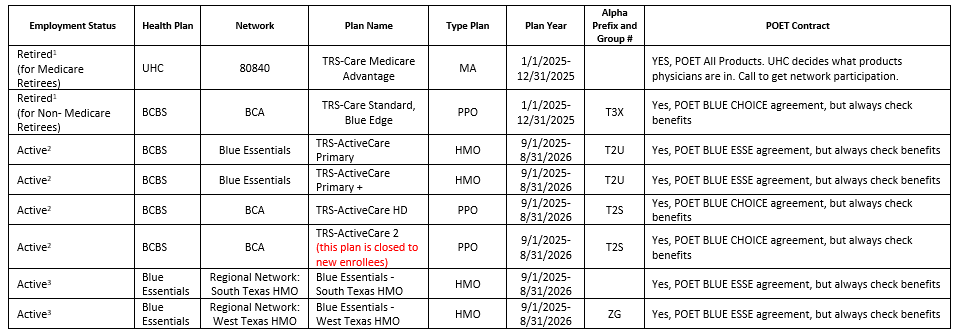
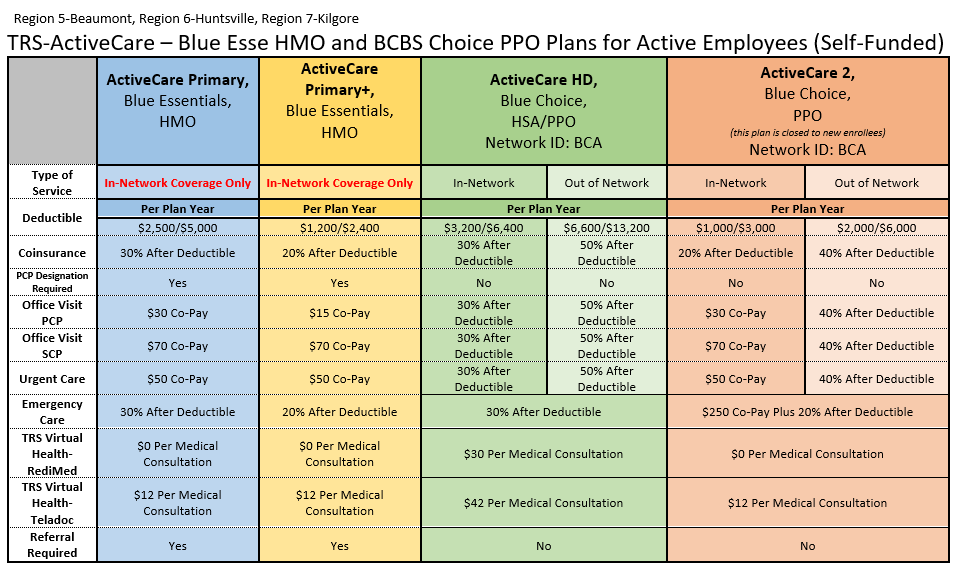
BCBSTX has notified POET that a NEW Fee Schedule for Blue Choice and Blue Essentials will be effective May 1, 2026.
Once POET receives the new fee schedule and completes its review, OPT-IN / OPT-OUT packets will be sent to physician offices for participation decisions.
Please watch for additional communication once the review process is complete
Interpreting insurance cards has never been easy, but with the constant changes in today’s insurance landscape, it has become nearly impossible.
Every week seems to bring a new insurance company—or anestablished insurer that has acquired several others, rebranded, and rewritten the rules.
On top of that, there are hybrid plans like POS and EPO, along with discount cards, medical cost-sharing programs, limited-benefit plans, and the growing model of Direct Primary Care.
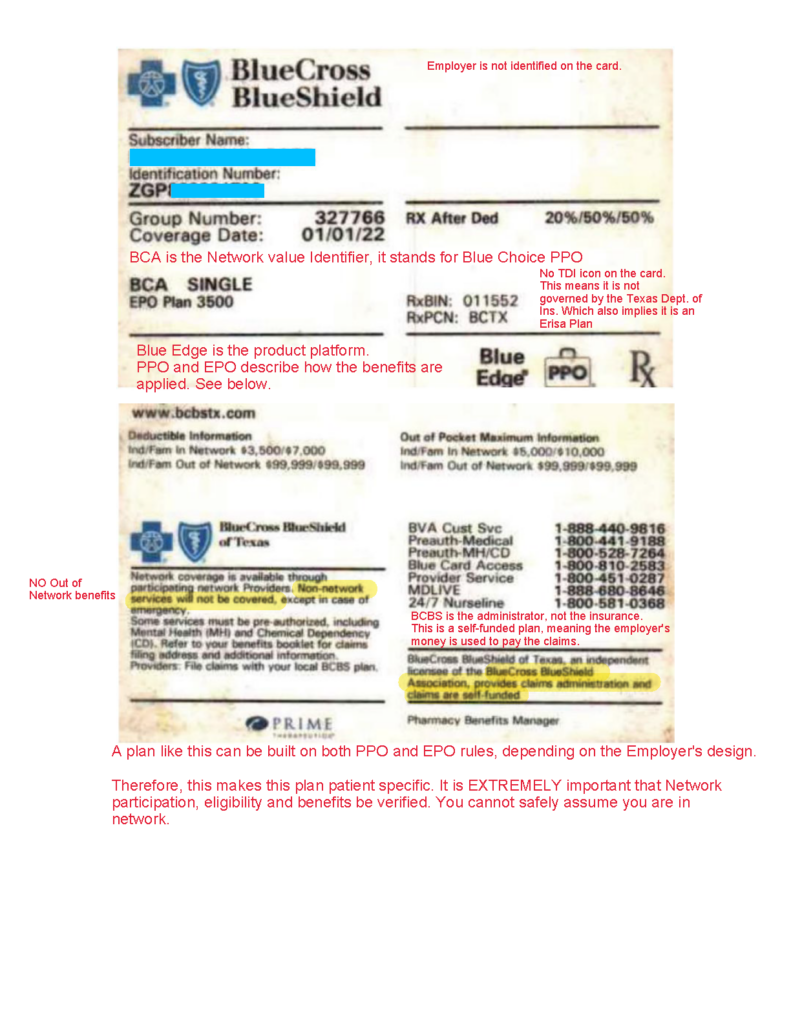
The one pictured below is an ultimate example!
It takes hybrid to a new level of complexity.
By mixing the rules of PPO and EPO in one plan.
Therefore, I, Sir Seymore, have taken my red pen in hand in an effort to make sense of it all.
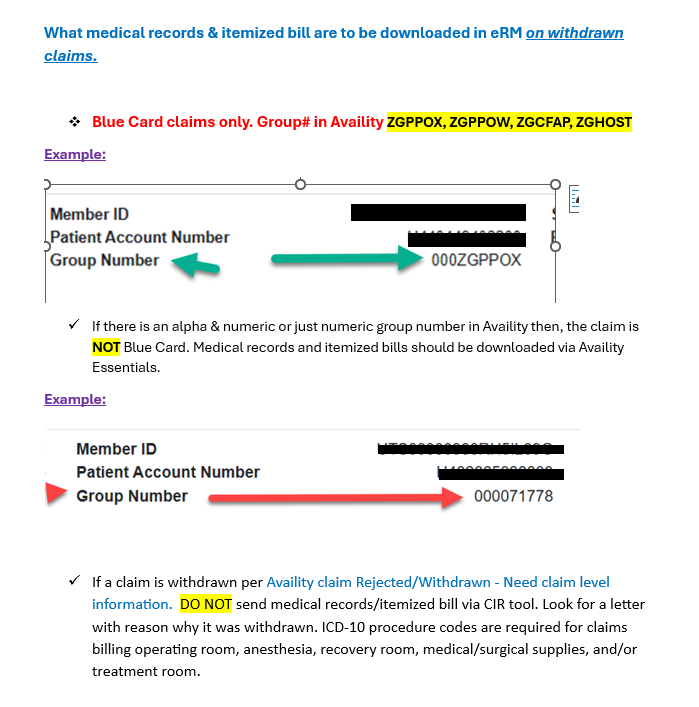
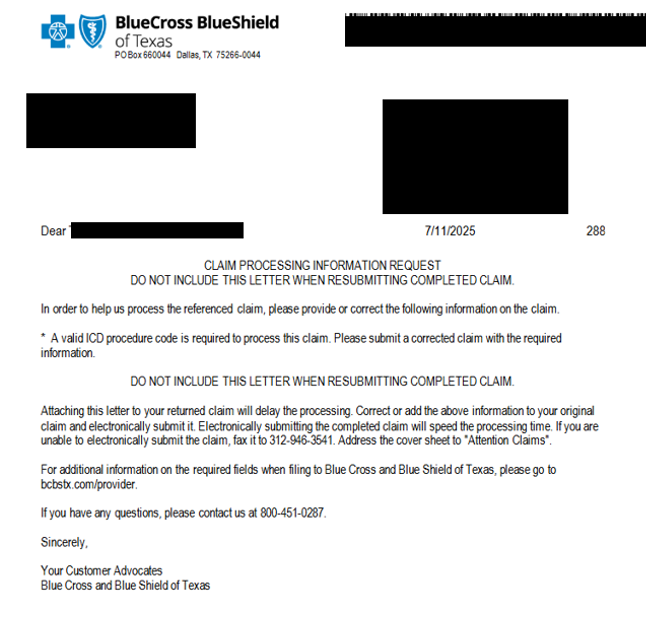
“The Claim Inquiry Resolution (CIR) tool within the Electronic Refund Management (eRM) portal accessed via Availity® Essentials only accepts inquiry submissions related to High-Dollar, Pre-Pay Review requests for most Host (BlueCard® out-of-area) claims (Medical Records and/or Itemized Bills). The other inquiry options that were available via CIR have transitioned to the Availity Claim Status Tool’s Dispute Claim or Message This Payer features.” Per BCBS Provider Education.
2. HealthSpring has supplied the spreadsheet that MUST be used. A link is provided below, or you may call POET, we will be glad to email you an electronic copy.
Only the columns with Red Lettering, need to be filled out by the Physician’s office.
4. Always feel free to copy [email protected] if you would like POET to be in the loop.
In a landscape cluttered with brand mashups, logo overload, and forgettable names—WellThis, WellThat, PlusThis, PlusThat, and the never-ending bowl of Alphabet Soup—clarity is a breath of fresh air. Amidst the noise, we’re proud to reintroduce a name that brings familiarity, trust, and simplicity back into focus: HealthSpring

%20%20%20%20%20%20%20%20%20%20%20%20%20%20%20%20%20%20%20%20%20%20-%20M.png)
Recent Comments