Fresh Print-Outs

Need Fresh Documents for your referral team?

Just Click the Buttons Below to Download or Print. 

Physician Directory and Provider Roster Update

Help Yourself!  Feel Free To Print!  

Great Resource Tools!

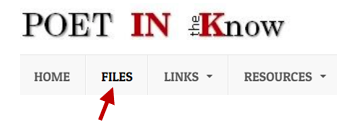
  • Click on the “files” tab.
  • Open the “Current information” folder.
  • Choose the document you would like to print.
  • Click the arrow in the box (top right of document).
  • When it opens tell it to print.

Fresh Print-Outs

Having these two documents at fingertips can be a great tool for your referral team.

Just click the button to print.

A lot of Changes to the Physician Directory

Updates for Your Front Desk

Do you have the latest information at your finger tips?

Just for you!

Reference Material for Your Staff that needs it.

Don’t cross your fingers or bring your rabbit foot.

 Just download, print and keep a current copy of POET’s Provider Roster and Directory at your desk to make the Referral and Authorization process a bit easier.

No Luck Needed

Physician Directory Update 11/17/2021

[embeddoc url=”https://community.poetllc.org/wp-content/uploads/2021/11/2021.11.17-POET-Physician-Directory.pdf” download=”all” viewer=”google”]

Physician Directory updated 10/25/2021

[embeddoc url=”https://community.poetllc.org/wp-content/uploads/2021/11/2021.10.25-POET-Physician-Directory.pdf” download=”all” viewer=”google”]

Physician Directory Updated 10/1/2021

[embeddoc url=”https://community.poetllc.org/wp-content/uploads/2021/10/2021.010.01-POET-Physician-Directory.pdf” download=”all” viewer=”google”]
Physician Directory Update

Who needs Google Maps, when you can download the Physician Directory from the POET INK files?

To download your front desk copy, just click.

You are welcome to Print this for your front desk.